Practical guide
Desk Facing a Door or Window: Glare, Privacy and Feng Shui Context
Start with display light and reflections, then compare doorway awareness, privacy and movement. Record actual conditions and keep a named feng shui convention separate from practical viewing requirements.
Choose viewing conditions before a direction label
For computer work, a window beside the display is often a useful arrangement to try: OSHA recommends placing the face of the display at right angles to windows and light sources. Facing a door can help you notice people entering, but the door, window, screen and chair must be considered together. Neither “face the window” nor “face the door” settles every room.
Begin with one question: what is difficult in your current work session? A window reflected on the display, a bright background beyond it, interruptions from behind and a screen visible to visitors require different responses. Name the observation before moving the desk.
This guide gives a comparison table, an editable light-and-layout record and six explained cases. The diagrams and worked log are original illustrations, not measurements of a client’s home. For door swings and furniture footprints before moving anything, use the separate scale-plan guide.
Describe the window, display and doorway
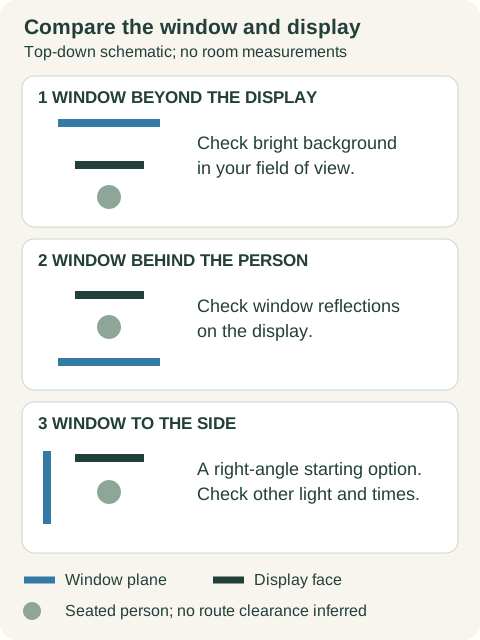
“Window behind the desk” can mean a window behind the seated person, beyond the monitor, or beside the furniture. Replace that phrase with a short sketch. Mark the display face, the direction you look, the window, the room entrance and the chair’s ordinary position. For a shared room, add where another person normally approaches.
Distinguish two lighting observations. A bright window beyond the display creates a high-brightness area in your field of view. A window behind your seated position may appear as a reflection on the screen. Both can make viewing awkward, but their geometry differs. Look from your actual seated position with your normal task; do not judge the screen only while standing in the doorway.
A desk’s long edge does not determine the display angle. A monitor may be angled on a desk, and a laptop may be moved within the available work area. Record the screen’s orientation as well as the furniture footprint. An adjustment must also leave the keyboard, papers and equipment usable; this page is not a complete workstation assessment.
Compare four common arrangements
| Arrangement | Observation | Bounded next step | Still to check |
|---|---|---|---|
| Window beyond the display | Bright background where you look | Try existing shading or another display orientation | Readability of both screen and paper at actual work hours |
| Window behind your seated position | Window reflected on the display | Try a feasible side-window arrangement or existing shading | Reflection from your seated viewpoint; other lights |
| Window beside the display | Useful starting arrangement; glare still possible | OSHA suggests display face at right angles to windows | Later sunlight, polished surfaces and task-lamp reflection |
| Desk facing into the room | Door awareness may conflict with privacy or movement | Check normal approach, chair pullback and door swing | Screen visibility, call background, light and shared route |
The side-window option is a trial, not a guarantee. Another window, direct afternoon sunlight, a ceiling light or a desk lamp can still reflect on the display. Check the actual screen rather than declaring an entire compass direction good or bad.
Door-facing does not have to mean sitting in the doorway’s direct line. A feasible angle can keep the entrance visible without putting the desk or chair in the circulation route. Conversely, a comfortable wall-facing desk need not be moved solely because another drawing looks more auspicious.
Test daylight and task lighting separately
OSHA’s workstation environment guide describes both direct brightness and reflected glare. Its suggested responses include display orientation, blinds or drapes, indirect or shielded lighting and task lighting for paper work. CCOHS distinguishes general lighting from local task lighting and notes that daylight depends on the building, sunlight direction, clouds, terrain and season.
Try controls you already have permission to use. Adjust an existing blind or curtain and note whether it changes the bright background or reflection. If daylight is reduced, check the notebook or printed page as well as the display. Making the whole room dark may remove one reflection while leaving paper work difficult.
Position a task lamp so its light helps the paper or work surface without reflecting on the screen or shining into your normal line of sight. Check it after a display move: a previously useful lamp can become a new reflection. Do not alter electrical fixtures or wiring for this worksheet.
Compare the same document and seated viewpoint at the times you actually work. Morning, midday and later sessions can reveal differences, but they are example observation points rather than a required schedule. If you work only after sunset, record that condition instead of inventing a daytime result. Keep “not checked” visible for other hours and seasons.
Check awareness, privacy and movement together
Seeing the entrance and keeping work private are separate needs. From the seated position, check whether you can notice someone approaching without repeatedly twisting around. From the normal approach, check whether the screen or papers are visible to others. Use a blank or non-sensitive example document for this exercise.
For video calls, review the background through the camera preview. Facing into the room may put a bed, shared storage or another person behind you. That does not automatically rule out the position, but it belongs in the comparison. A simple background or a household agreement may be more workable than turning the desk.
Mark the door’s actual swing and the chair’s normal pullback, not only furniture at rest. Open the door and use the route in the ordinary way. Include storage doors or drawers you regularly need. USFA says home escape-plan maps should include doors and windows and keep them unblocked; it does not authorize a universal clearance number for this room.
Keep the doorway, necessary window access and shared route usable. Do not add a freestanding screen, mirror or plant merely to create “support” if it crowds movement. Where the desk cannot move, consider a clear approach and an agreement that people announce themselves. Record whether that answers the actual interruption problem.
Read the commanding-position convention with its source
In the checked International Feng Shui Guild article, Tori McBrien describes the command position as being able to see the room entrance without sitting directly in line with the door. Her biography identifies Black Sect feng shui practice. The article includes desks among the furniture discussed and associates the desk with a path in life or career.
That is a named practitioner’s explanation of a cultural convention. It should not be presented as agreement among every feng shui school, a complete compass analysis, or evidence that desk placement produces a promotion, financial change or health outcome. The article compares the idea with prospect-and-refuge theory; we have not used it as a controlled psychological study.
If the convention matters to you, record it as one preference alongside the light, privacy and movement checks. “I prefer to notice the entrance” is an observable requirement. “This position guarantees career success” is not a conclusion supported by this worksheet.
The practitioner mentions mirrors when direct placement is constrained. A mirror can show an approach, but it can also introduce a bright reflection, display private material or require an unsuitable mounting position. It is an option to assess, not a compulsory cure. No new object is needed when your present room works and the proposed change creates a problem.
Keep a light-and-layout record you can compare
View the window-and-display comparison, then download the editable light-and-layout record. Copy actual room constraints first. The diagram is a top-down reading aid, not a surveyed plan or a prediction of light paths.
DATE / TIME / CLOUD OR DAYLIGHT CONDITIONS:
TASK / DISPLAY / PAPER USED:
WINDOW RELATIVE TO SEATED PERSON AND DISPLAY:
BLIND / CURTAIN / GENERAL LIGHT / TASK LIGHT:
BRIGHT BACKGROUND OR REFLECTION OBSERVED:
DOOR VIEW / SCREEN PRIVACY / CALL BACKGROUND:
DOOR SWING / CHAIR PULLBACK / ROUTE:
FIXED FURNITURE / LEASE / SHARED-USE CONSTRAINT:
ONE CHANGE TRIED:
SAME-TASK OBSERVATION AFTERWARD:
OTHER TIMES OR CONDITIONS NOT CHECKED:
KEEP / REVERSE / QUESTION TO RESOLVE:
| Example time | Arrangement | Observation | One trial | Limited result |
|---|---|---|---|---|
| 09:00 | Window beyond display; blind open | Bright background distracts from same document | Adjust existing blind; retain task lamp | Background less distracting; no illumination measurement |
| 13:00 | Window behind chair | Window reflection crosses display | Try feasible side-window position | Reflection less obvious; chair route still unresolved |
| 18:00 | Side-window trial; daylight fading | Paper notebook harder to read | Use task light away from display | Paper clearer; daylight-only trial insufficient |
These entries separate the observation from the change. They do not report actual household tests, illuminance readings or a productivity improvement. The midday entry still leaves chair movement unresolved, so it is not a completed placement decision.
If conditions change while you compare, write that down. A cloud moving across the sun may explain part of the difference. Changing the lamp, blinds and desk together makes it difficult to describe what mattered. Keep a workable improvement without turning a short observation into proof of causation.
Six layout questions with explanations
Try each fictional situation before opening its explanation. Distinguish a light observation, a practical constraint and a practitioner convention.
Case 1
You can see the door, but a bright window is directly beyond the monitor. Does doorway visibility settle the layout?
Show answer and explanation for case 1
No. Check the bright background separately.
Doorway awareness and comfortable viewing are different observations. Try a feasible display orientation or existing shading, then repeat the same reading task. A traditional position label cannot cancel a lighting problem.
Case 2
A window is behind your chair and its outline appears on the screen. Is this the same problem as a window beyond the monitor?
Show answer and explanation for case 2
The observed issue is a reflection on the display, rather than only a bright background beyond it.
Identify where the light appears before choosing a change. OSHA’s right-angle display/window arrangement is a starting option; existing blinds and other light sources still need checking. “Window behind the desk” alone is ambiguous.
Case 3
A side-window arrangement works at 09:00. Can you call it glare-free for the whole year?
Show answer and explanation for case 3
No. Record the hours, conditions and task actually checked.
CCOHS describes daylight as dependent on sunlight direction, cloud cover, surroundings and season. One morning does not verify an afternoon, another season, or another screen and task.
Case 4
Moving the desk to see the entrance prevents the room door from opening properly. Should the symbolic position take priority?
Show answer and explanation for case 4
Keep the doorway and route usable; reject that placement.
USFA says to keep doors and windows unblocked. This worksheet supplies no universal passage width or building-specific approval. Another sightline or a communication habit can be considered within actual constraints.
Case 5
A practitioner associates a commanding desk position with career. Does that prove a promotion or improved concentration?
Show answer and explanation for case 5
No. Attribute the convention and keep outcomes separate.
The checked Tori McBrien article describes a visible entrance without direct alignment and identifies Black Sect practice. It is a practitioner explanation, not a controlled study establishing career or mental-health effects.
Case 6
Your desk is fixed with your back to the entrance, but you work comfortably and others announce themselves. Must you buy a mirror?
Show answer and explanation for case 6
No purchase follows from that layout description alone.
A mirror is one practitioner suggestion, not a requirement or verified remedy. Check whether a practical problem exists. A new reflection can create glare or expose the screen, so evaluate those consequences first.
The useful final decision is specific: a position you can use for the task, light you can manage, a route that remains workable and a cultural preference clearly identified as such. Keep the current setup when the comparison supplies no practical reason to change it. Return to the record when another season, equipment change or shared-room need makes the question relevant again.
Sources and further reading
- OSHA: Computer Workstations — Workstation EnvironmentDisplay orientation, reflected glare, bright backgrounds and separate task lighting for computer work. General workstation guidance; older CRT lighting examples are outside this worksheet.
- CCOHS: Lighting Ergonomics — GeneralDaylight varies with the building and conditions; general lighting and local task lighting differ. Fact sheet revised 10 July 2025.
- USFA: Home Fire Escape PlansMap actual doors and windows and keep them unblocked. Home escape-planning guidance supplies no universal desk clearance. Page reviewed 10 April 2025.
- Tori McBrien / International Feng Shui Guild: The Feng Shui Command PositionTori McBrien describes a visible entrance without direct alignment, and her biography identifies Black Sect practice. Cited for a named practitioner convention, without establishing career, health or financial outcomes.